Key Takeaways
- Separate live website feedback from uploaded design and PDF review.
- Compare the plan that fits your recurring workload, including review allowances and concurrent work.
- Count internal creators separately from guest reviewers and comment-only teammates.
- Resolving feedback and approving a file are separate decisions.
- Test one complete client review before switching. Jottrly’s final pricing and guest-account terms remain unconfirmed.

Which Markup.io Alternative Should You Consider?
Short answer: Consider Jottrly for file review and website URL captures, Pastel for interactive website annotation, Workflow for a creator-seat model, Filestage for review groups, and BugHerd for website feedback that becomes team tasks. The right choice depends on the deliverables, reviewers, and decisions in your process.
A replacement should address the reason you are switching. A lower entry price is not enough if you need a different tier for client visibility or approval features. Likewise, a broad proofing platform can add cost without helping a studio that mainly reviews static mockups.
How This Comparison Was Prepared
Jottrly publishes this article and appears in the shortlist. Competitor details come from official product, pricing, and help pages checked October 12, 2026. This is a documentation-based comparison, not a hands-on performance test or scored ranking. Jottrly’s scope comes from founder-provided information; current app behavior and final commercial terms have not been independently verified here.
Markup.io Alternatives at a Glance
Prices below are USD before tax. Monthly payments and annual equivalents are labeled separately. A canvas, project, and monthly MarkUp allowance measure different things.
| Tool | Review Focus | Client Access | Price and Main Constraint |
|---|---|---|---|
| Markup.io baseline | Websites, images, PDFs, videos | Shared review links; verify settings | Pro $79/month: 50 MarkUps/month, unlimited users. 14-day trial. |
| Jottrly | Uploaded designs, PDFs, website URL captures | Share links; account requirements unconfirmed | Final prices, limits, and free-offer terms unconfirmed. |
| Pastel | Website annotation and uploaded assets | Account-free reviewing documented | Free: 1 user, 1 canvas. Pro $35/month: 2 users, 3 canvases. |
| Workflow | Websites and creative media | Clients and comment-only teammates free | $20/month per uploading seat; $16/month per seat billed yearly. |
| Filestage | Internal and external review groups | Account-free reviewers documented | Free: 1 active project, 5 new files/month. Starter $249/month or $199/month billed yearly. |
| BugHerd | Website feedback and trackable tasks | Account-free client feedback documented | Standard $50/month: 5 members, unlimited projects and clients. Advanced client collaboration requires a higher plan. |
For a wider overview beyond replacing Markup.io, compare visual feedback tools for agencies.
Why Consider Switching From Markup.io?
Start with a concrete mismatch: the review allowance no longer fits, clients need a different experience, or your team needs another way to handle revisions and decisions. Our breakdown of common client feedback problems can help separate a software limitation from unclear review instructions.
Markup.io’s current pricing page lists Pro allowances of 50, 75, or 100 MarkUps per month at $79, $99, or $129. Extra MarkUps cost $4 each, purchased in batches of ten. Unlimited users can be valuable for a large review team; review volume still needs a separate budget.
Before moving, check whether a different allowance solves the problem. If Markup.io already handles your files, clients understand it, and the plan fits, switching creates work without a clear benefit. Preserve a familiar process when the alternative does not improve the recurring review.
What to Compare Before Choosing
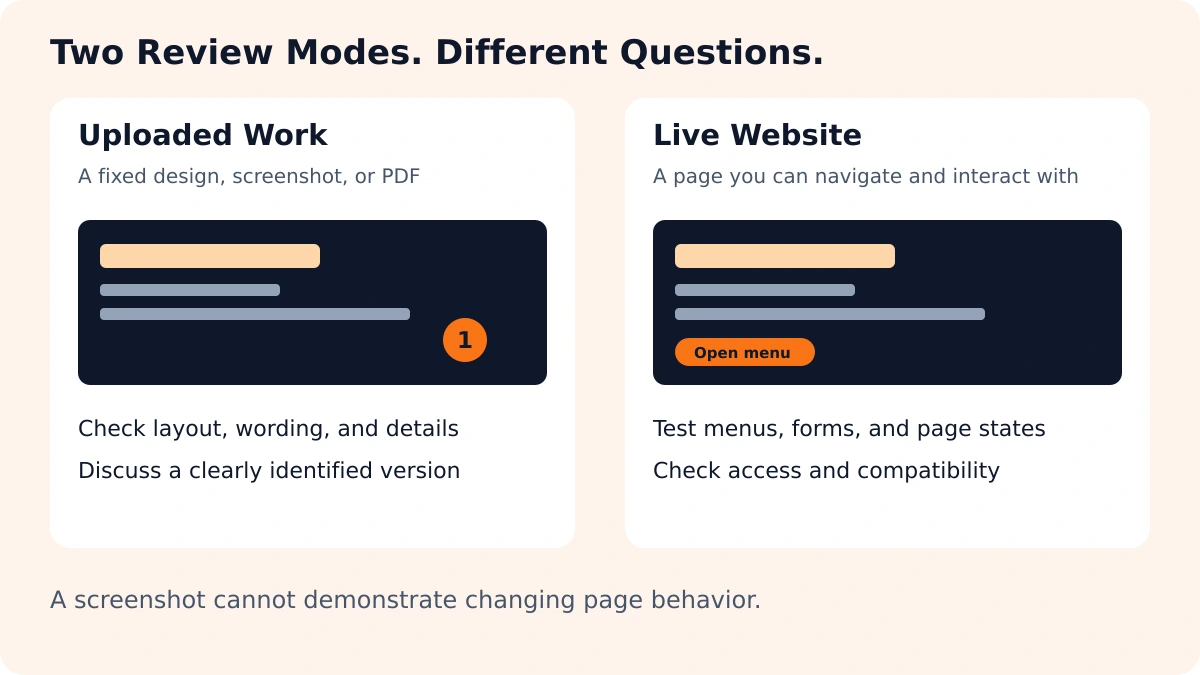
An uploaded screenshot captures one state. It cannot demonstrate what happens after a visitor opens a menu, submits a form, or changes screen size. A website review needs compatible access to those states. Test a password-protected staging page and its important interactions.
- Feedback context: Check whether a reviewer can mark the element and discuss the request in its own thread.
- Revision handling: Identify the current file and check how previous feedback is retained. Version history does not automatically mean side-by-side comparison.
- Approval: Determine what the final decision records and who can make it. A resolved comment is one completed issue.
- Client access: Open a review as an external participant and record the actual access steps.
- Commercial fit: Check allowances, concurrent work, upload sizes, storage, exports, and the required tier.
Use a specific request during the test. These examples show how to give design feedback your team can use.
1. Jottrly: Focused Design Feedback and Approval Status
Jottrly is a visual feedback and approval tool for creative teams and agencies. Its founder-described scope covers uploaded designs, screenshots, PDFs, and website URL captures, plus numbered pins and annotations, per-mark comment threads, open and resolved feedback, version history, and file statuses.
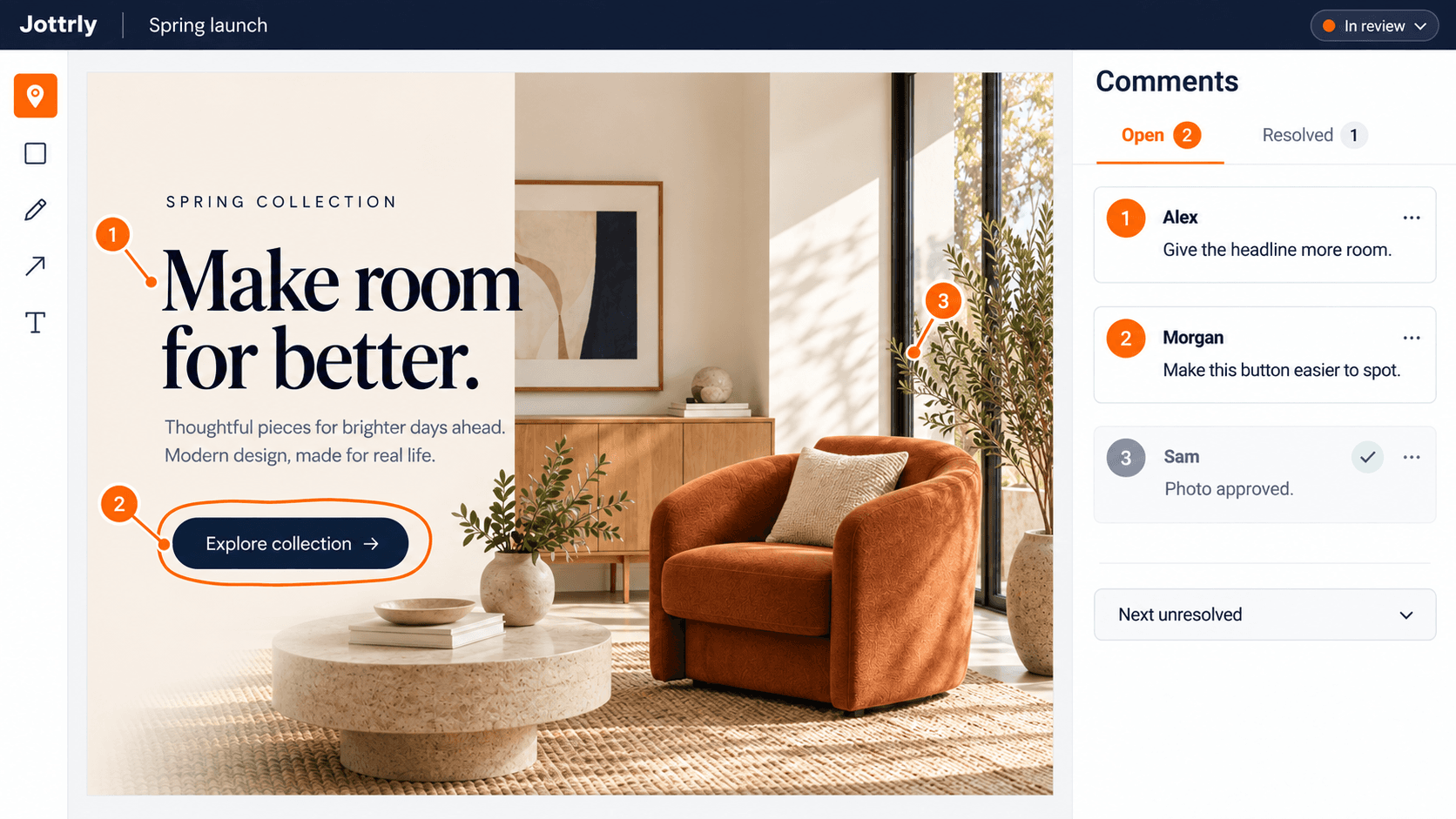
Agency example: A studio shares a homepage mockup. The client marks a vague button label, the designer discusses the intended action, and the team checks the revised file before recording its status. The workflow gives each request a location and a discussion.
Jottrly’s defined job is visual review alongside the agency’s wider project process. Explore its visual feedback and approval features to see annotations, comments, revisions, access controls, and described CSV/PDF exports.
What to confirm: Supported extensions, capture access, upload limits, guest-account requirements, and feature entitlements. A URL capture is a fixed visual snapshot, not an interactive live website review; side-by-side comparison remains unconfirmed.
Pricing: Final terms remain unconfirmed. Do not calculate savings from provisional website plans. Jottrly belongs on this shortlist because of its intended review focus, not a verified lowest-price claim.
Keep Feedback and Review Decisions Together
Explore Jottrly’s currently published plans and confirm final pricing, availability, and limits before choosing.
Explore Jottrly Pricing2. Pastel: Website Annotation With Shared Canvases
Pastel documents live website, image, and PDF feedback. Its shared canvas approach is relevant when an agency wants clients to identify an issue on a page or creative asset.
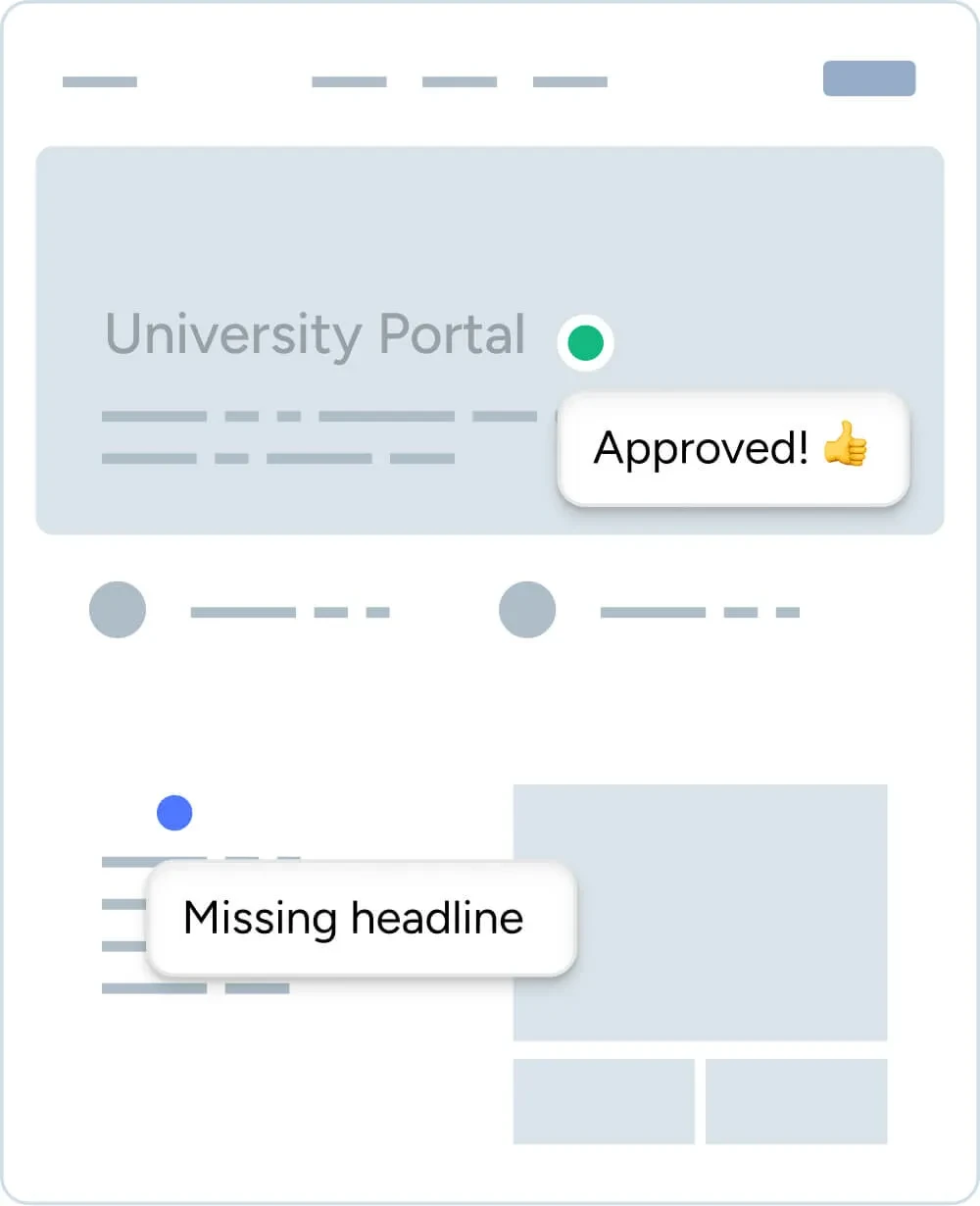
Agency example: A client reviews a staging page and points to a missing headline. The team discusses that note beside the page instead of translating an email into a location. Pastel documents account-free participation and tools for organizing the review.
Check its workflow explanation and plan limits. Free includes one user and one canvas. Pro costs $35/month for two users and three canvases. Team starts at $119/month for five users and unlimited canvases; additional users are $24/month.
Main tradeoff: The inexpensive entry plan has limited internal seats and canvases. An agency managing more concurrent work needs to budget for Team. Confirm how completed canvases are counted and which export or integration your plan includes.
3. Workflow: Pay for the People Who Upload New Work
Workflow describes comments on live websites, PDFs, Figma designs, and other creative media. It also documents version history and an approval button. Its pricing distinction is who needs permission to add new work.

Agency example: Two designers upload work while an account manager, developer, and clients only comment. Under its published model, the uploading designers need paid seats; comment-only teammates and reviewers do not.
The Standard plan costs $20/month per uploading seat, or $16/month per seat with yearly billing. Initial projects remain available for collaboration after the trial; starting new work requires an upgrade.
Main tradeoff: Website compatibility matters. The pricing FAQ says Workflow does not work on single-page applications. It also labels version comparison as coming soon. Do not count that feature as available when deciding whether the tool fits.
4. Filestage: Organize Internal and External Review Groups
Filestage focuses on file proofing and review groups. It suits a process where the agency needs to separate an internal review from a client decision rather than collect every opinion in one undifferentiated round.
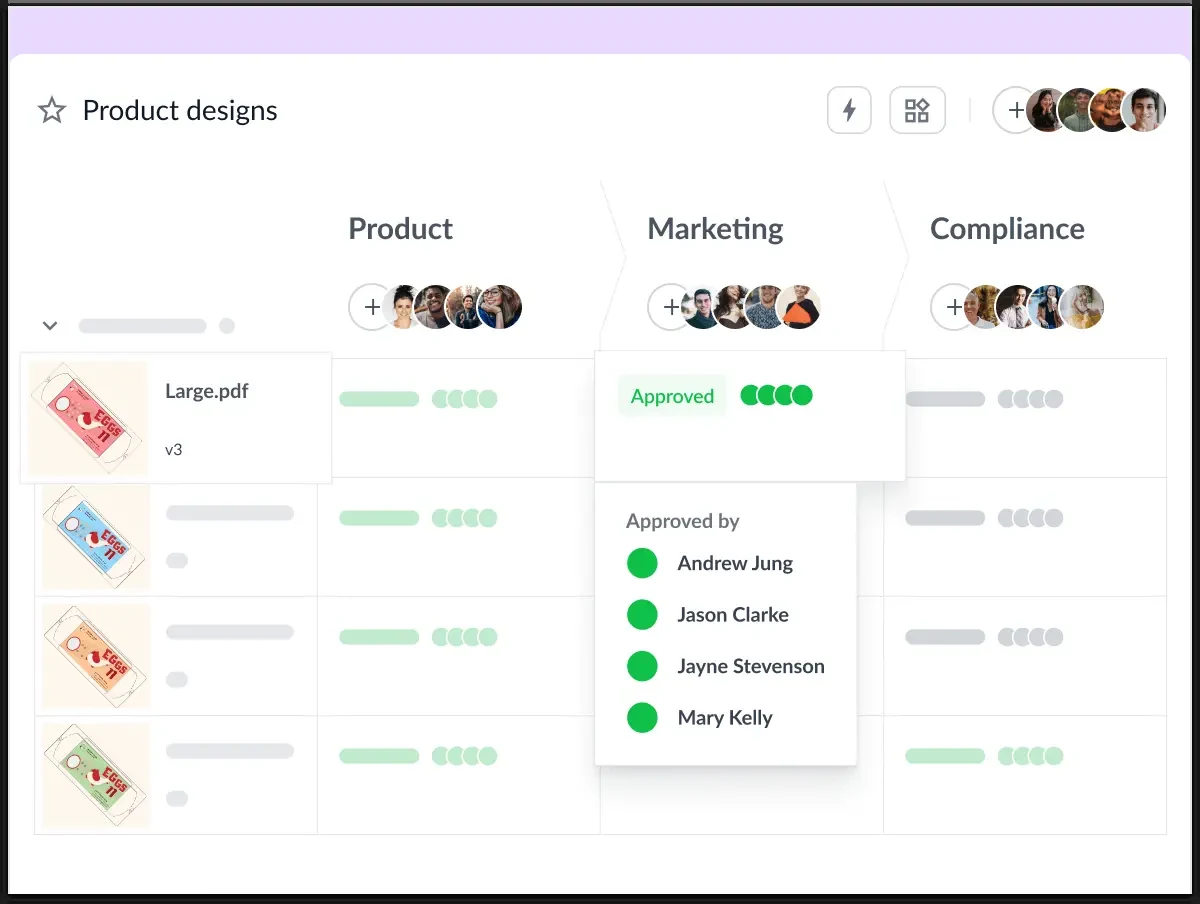
Agency example: The designer and account lead check a campaign PDF internally before inviting the client group to approve it. The number of required groups helps determine the plan.
Its Free plan includes one active project, five new files per month, two reviewer groups, and ten team members. Starter is $249/month, or a $199/month equivalent billed yearly, with ten included seats and unlimited active projects and new files.
Main tradeoff: Advanced workflow requirements change the budget. Three reviewer groups, review reports, and marking comments resolved are listed under Business. Confirm the features you require rather than treating Starter as the price of every approval workflow.
5. BugHerd: Turn Website Feedback Into Team Tasks
BugHerd connects a website comment to a task, with a captured screenshot and technical context. Its Kanban board is useful when the next step is assigning and working through implementation requests.
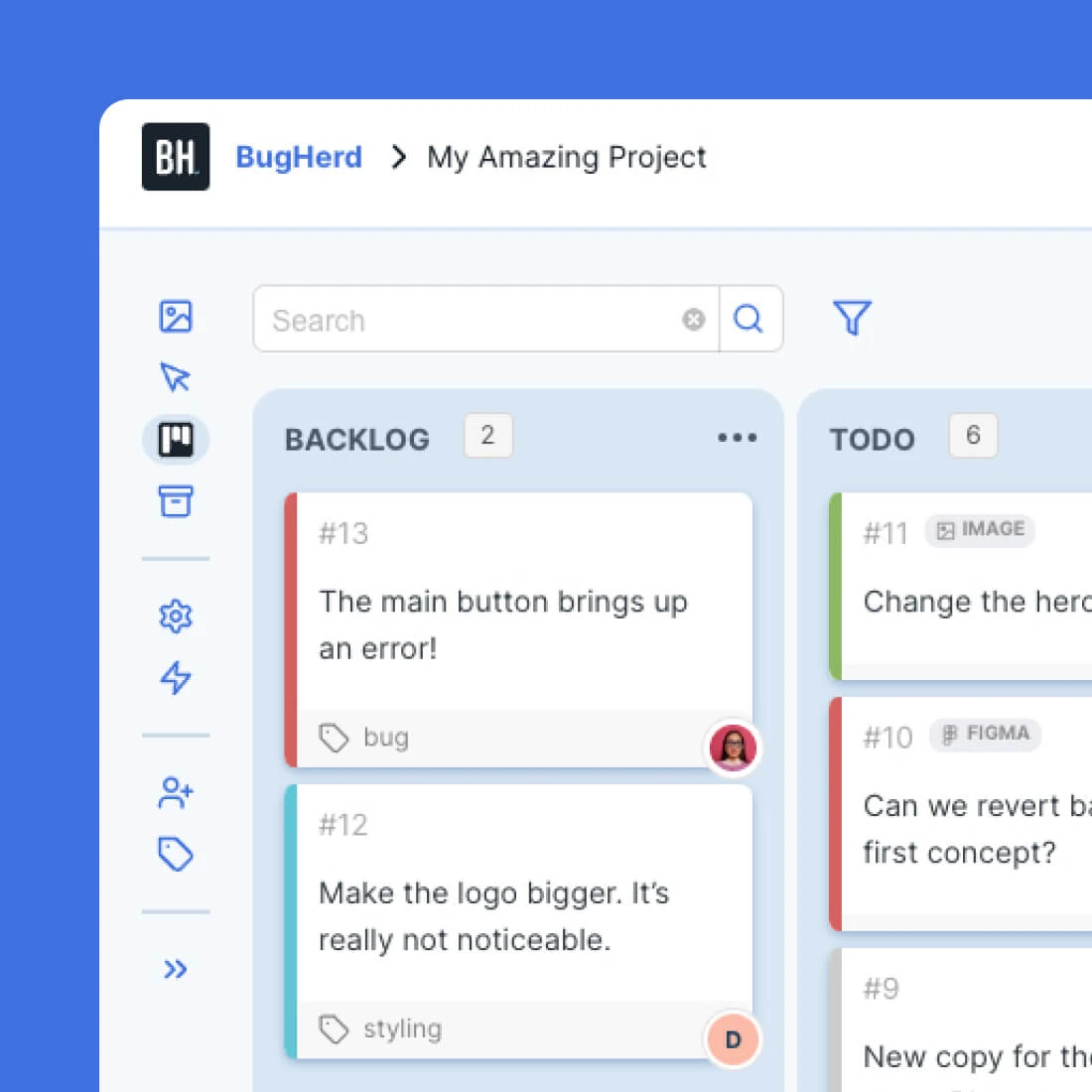
Agency example: A client reports that a button opens an error page. The team receives a task with the page context, prioritizes it, and checks the fix. The task record supports implementation; the team still needs a clear final review decision.
According to current plans, Standard is $50/month for five members, unlimited projects, and unlimited clients. It lists website, Figma, PDF, and image feedback. Premium is $150/month for twenty-five members.
Main tradeoff: Advanced client collaboration, including the client task board and private team commenting, sits in Premium. Test guest visibility on the selected tier. Account-free feedback does not mean every client can see every discussion or manage the same board.
Compare the Cost of Your Actual Workload
These two scenarios illustrate paid-plan capacity, not identical feature packages. The solo case needs one uploading team member and three concurrent review spaces. The agency case needs five uploading members and more than three concurrent review spaces. Both stay within Markup.io Pro’s 50-MarkUp monthly allowance.
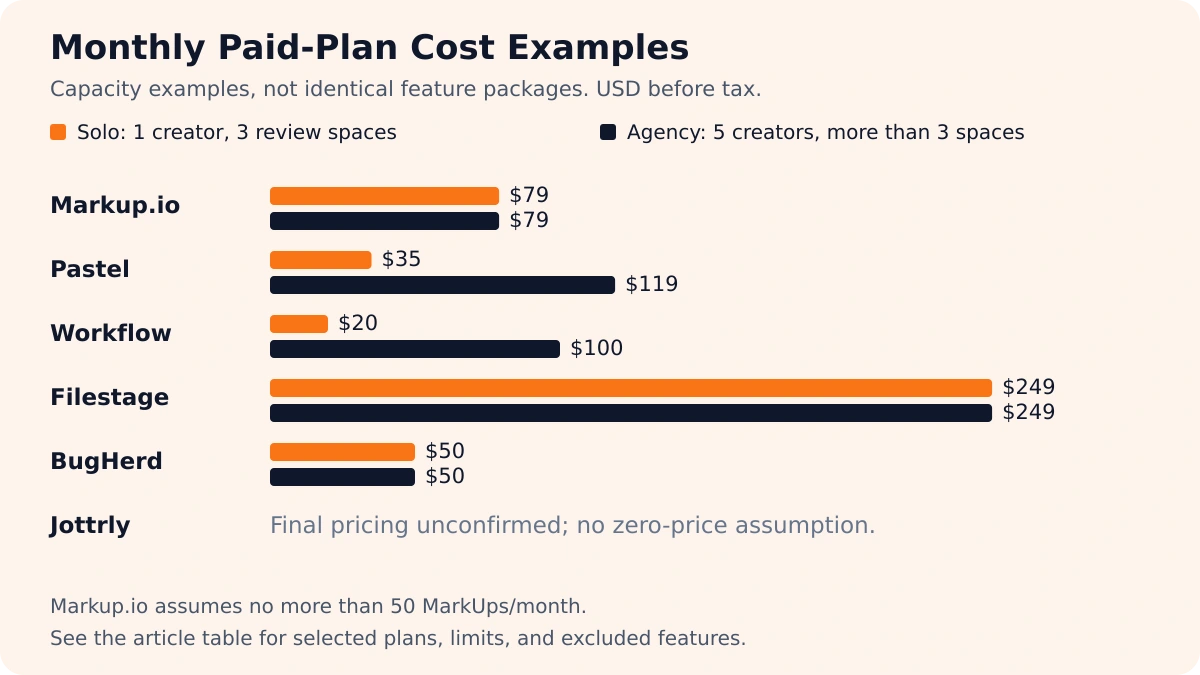
| Tool | Solo Case | Five-Creator Case | Capacity Assumption |
|---|---|---|---|
| Markup.io | $79 Pro | $79 Pro | No more than 50 MarkUps/month; unlimited users. |
| Pastel | $35 Pro | $119 Team | Three canvases for solo; Team for more canvases and five users. |
| Workflow | $20 Standard | $100 Standard | One versus five people upload new work; comment-only participants free. |
| Filestage | $249 Starter | $249 Starter | Multiple active projects; up to ten included team seats. Business-only features excluded. |
| BugHerd | $50 Standard | $50 Standard | Up to five members; advanced Premium collaboration excluded. |
| Jottrly | Not confirmed | Not confirmed | Final price and entitlements need confirmation. |
Change the workload and the answer changes. Eighty new MarkUps would put the baseline in Markup.io’s $129 plan with a 100-MarkUp allowance. More uploading creators increase Workflow’s seat cost. Additional internal users and required workflow features can also move another tool into a different tier.
Ask what counts against each allowance, including revised files. Then review Jottrly’s currently published plans and confirm its final terms before making a savings claim.
Choose by the Review Work You Need to Do
Uploaded Designs and PDFs
Review Jottrly’s described scope alongside the file-review capabilities of the established alternatives. Check rendering, annotations, revisions, and the final decision. See how Jottrly’s review process works for its intended sequence.
Website Feedback
Consider Jottrly for a captured page with pinned comments. Shortlist Pastel and Workflow when reviewers need an interactive website experience, or BugHerd when requests need technical context and task ownership. Test staging access and page behavior on the actual site; a capture cannot verify interactions.
Multiple Approval Stages
Investigate Filestage’s reviewer groups and required tier. Define who makes the decision and what happens when changes are requested. A tool supports the process; your team still needs to build a clear client design approval process.
A Practical Switching Checklist
Use a non-confidential project that resembles your work. Include someone acting as the client, and test a revision rather than stopping after the first comment.
- Preserve the old review: Save available exports, files, version references, and decisions before closing access. Check whether attachments and resolved threads are included.
- Identify the current file: Give the new review a clear filename and revision reference. Do not mix historical requests into the current change list.
- Test external access: Record the steps a client must take, including identity checks and link restrictions.
- Run the full round: Mark an issue, discuss it, upload a revision, check the correction, and record a separate approval decision.
- Check handoff: Open the export outside the tool and confirm it contains the information your team needs.
- Confirm the ongoing plan: Verify usage definitions and what changes after the trial. Keep the old review available until the new process is usable.
Do not assume review history imports automatically. Ask the vendor about any documented import before promising a migration. Clear boundaries also help you manage design revisions without scope creep when the client adds new work during the changeover.
Choose the alternative that supports the reviews you repeat. A useful switch makes the current work, requests, and next decision easier for the team to follow.
Frequently Asked Questions
Which Markup.io alternative suits a small creative agency?
Start with the work you review. Jottrly supports uploads and URL captures of website pages for feedback. Pastel and Workflow document interactive live website reviews; BugHerd connects website feedback to tasks; Filestage organizes internal and external review groups. Compare the required plan and test a representative client review before choosing.
Are there free Markup.io alternatives?
Pastel lists a Free plan with one user and one canvas. Filestage lists a Free plan with one active project and five new files per month. Workflow lets you continue collaborating on your initial projects after its trial, but requires an upgrade to start new work. Markup.io currently lists paid plans and a 14-day trial. Jottrly’s final free-offer terms are unconfirmed.
Which alternatives support live website feedback?
Pastel, Workflow, Filestage, and BugHerd document live website feedback. Their access methods and compatibility differ. Workflow specifically says it does not work with single-page applications. Test staging access, forms, navigation, and dynamic content. Jottrly captures a website page from its URL for pinned feedback. The capture is a fixed snapshot; test navigation, forms, and dynamic behavior on the actual site.
Which tools handle PDFs and design mockups?
Pastel, Workflow, Filestage, and BugHerd document PDF and design-file review. Uploaded designs, screenshots, and PDFs are also part of Jottrly’s founder-described scope. Confirm the specific extension, upload size, page rendering, and plan entitlement with a sample file before relying on a tool for client work.
Do clients need an account to leave feedback?
Pastel, Workflow, Filestage, and BugHerd describe client or reviewer participation without creating an account. Link settings and identity requirements can still apply. Confirm what a reviewer must do in the actual project. Jottrly’s guest-account requirements are not confirmed in this comparison.
How should I compare the total monthly cost?
Count the people who upload and manage work separately from guest reviewers. Then check concurrent review spaces, monthly allowances, storage, exports, and required approval features. Compare monthly payments with monthly payments, and label annual commitments separately. Use each vendor’s definition of a canvas, project, seat, or MarkUp.
How can I preserve review records when switching?
Before closing the old account, check its available exports and save the files, comments, version references, and approval decisions you need. Confirm whether exports include attachments and resolved threads. Test any documented import separately. Keep access to the previous review until the replacement is usable; do not assume comments and approvals migrate automatically.
Does resolving every comment mean the design is approved?
No. Resolving comments closes individual issues. Approval is a separate decision about the work being reviewed. Ask the decision owner to review the revised file and confirm its status. A completed task board or empty list of open comments does not, by itself, establish approval of a particular file.
Choose Around Your Review Process
Explore Jottrly’s currently published plans and confirm final pricing, availability, and limits before choosing.
Compare Jottrly PlansOfficial Sources and Verification Notes
Research checked October 12, 2026. Price examples use month-to-month USD rates before tax. Annual equivalents are identified separately. Plans and product behavior can change.
- Markup.io product and pricing and monthly allowances.
- Pastel review workflow and plans and canvas limits.
- Workflow product and pricing, creator-seat definition, and compatibility FAQ.
- Filestage file proofing and pricing and feature entitlements.
- BugHerd website feedback and plans and client-collaboration features.
Vendor visuals come from the linked official pages and illustrate the vendors’ own presentations. Jottrly imagery is illustrative. The cover is AI-generated; diagrams and the price chart are editorial graphics built from the stated comparison data.